
Explainer video production: How to plan a video that sells the idea
Explainer video production begins with the uncomfortable part: deciding what the video should say. And when a video tries to say everything, the viewer usually remembers very little.
A good explainer video has a narrower job. It helps the viewer understand one clear idea, see why it is useful, and know what to do next. That is why explainer video production should be treated as a planning exercise before it becomes a production exercise. The camera, animation, motion graphics, voiceover, music, and editing all come later. First, the message needs to be clear.
For B2B teams, this is especially important. Many products and services are not simple at first glance. A consulting offer may have several layers. A SaaS platform may solve a workflow problem that is hard to describe in one sentence. A marketing service may combine strategy, design, production, and campaign support. A deck, website page, or sales call can explain those ideas, but a well-planned video can make the first understanding happen faster.
This is exactly where a good corporate video production process becomes useful. The video becomes a clearer way to explain what the business does, who it helps, and why the viewer should care.
And people do use video to learn. Wyzowl’s 2026 video marketing report says 96 percent of people have watched an explainer video to learn more about a product or service. The same report says 85 percent of people have been convinced to buy a product or service after watching a video.
That does not mean every explainer video will sell. It means people are willing to use video to understand something. The quality of the planning decides whether they leave clearer or more confused.
What is an explainer video?
An explainer video is a short video that explains a product, service, offer, process, or idea in a simple and structured way.
It usually answers four questions:
| Viewer question | What the video should answer |
|---|---|
| What is this? | The product, service, offer, or idea |
| Why should I care? | The problem, need, risk, or opportunity |
| How does it help? | The outcome, benefit, or easier way forward |
| What should I do next? | The action after watching |
The best explainer videos took the messy version of the idea and cleaned it up for the viewer.
Also, that is the part many teams underestimate.
- A homepage explainer is different from a product demo.
- A product demo is different from a sales video.
- A sales video is different from onboarding content.
- An onboarding video is different from a campaign teaser.
They may all use video, but they do not have the same job.
If the video is meant to support a sales conversation, it should help the buyer understand the problem, the value, and the next step. This connects closely with how a strong sales deck design works. Both are tools for helping people move from interest to understanding, then from understanding to action.
The problem: Starting too late with explainer videos
Many teams begin with questions like:
- What style should we use?
- Should it be animated?
- Can it be 60 seconds?
- Can we make it look premium?
- Can we include all the features?
Those are useful questions, but it should start with ‘What does the viewer need to understand after watching this?’ This one question saves time, budget, and revisions.
Once the purpose is clear, the rest of the decisions become easier. The script becomes tighter. The storyboard becomes more focused. The visuals have a reason to exist. The call to action feels natural instead of forced.
Think about it along this line:
| If the video is for | The main job is |
|---|---|
| Website visitors | Explain the business quickly |
| Sales prospects | Help them understand the value |
| Product users | Show how something works |
| New customers | Reduce confusion after purchase |
| Internal teams | Explain a process, change, or launch |
| Event audiences | Introduce the idea before the deeper conversation |
This is why the planning phase should not be rushed.
Start with the viewer first
One of the fastest ways to weaken an explainer video is to open with the company.
“At CompanyName, we provide innovative solutions…”
Viewers have heard some version of that sentence before. It sounds safe, but it does not pull them in
A stronger opening starts with the viewer’s situation.
For example:
Weak opening:
“At FlowTrack, we offer a modern platform for workflow management.”
Better opening:
“Approvals often get stuck between email threads, spreadsheets, and follow-up messages. By the time someone asks for the status, nobody is sure which version is final.”
The second version works harder because it gives the viewer something familiar. Before people care about your solution, they need to feel that you understand the problem.
For B2B services, this is even more important. A buyer may not be looking for “a video.” They may be looking for a clearer way to explain a service, launch a campaign, support sales, or align a team. This is where video overlaps with broader creative design services, because the need is clearer communication that helps people make decisions.
Find the one message the viewer should remember
Every explainer video needs one main message. Not a list of claims, a pile of features or every reason the company is good.
One message: That message should be easy for the viewer to repeat after the video ends.
For example:
| Business type | Weak message | Stronger message |
|---|---|---|
| SaaS platform | We help teams collaborate better | Bring approvals, comments, and reporting into one clear workflow |
| Consulting firm | We help businesses grow | Turn scattered growth ideas into a focused action plan |
| Design partner | We create business assets | Turn complex business content into clear presentations, videos, and marketing assets |
| HR platform | We improve recruitment | Help hiring teams shortlist better candidates faster |
| Training company | We provide learning solutions | Help teams learn new processes without slowing daily work |
The stronger message gives the video direction. It also helps with the script. If a line does not support the main message, it probably does not belong in the video.
This is the same discipline used in strong presentation work. In visual hierarchy in design and presentation, the goal is to help people see what is most important first. Explainer videos need that same discipline, only with time, motion, voice, and scenes added to the mix.
A structure for an explainer video that help get started
A clear explainer video does not need a complicated story structure. For most B2B videos, this flow works well:
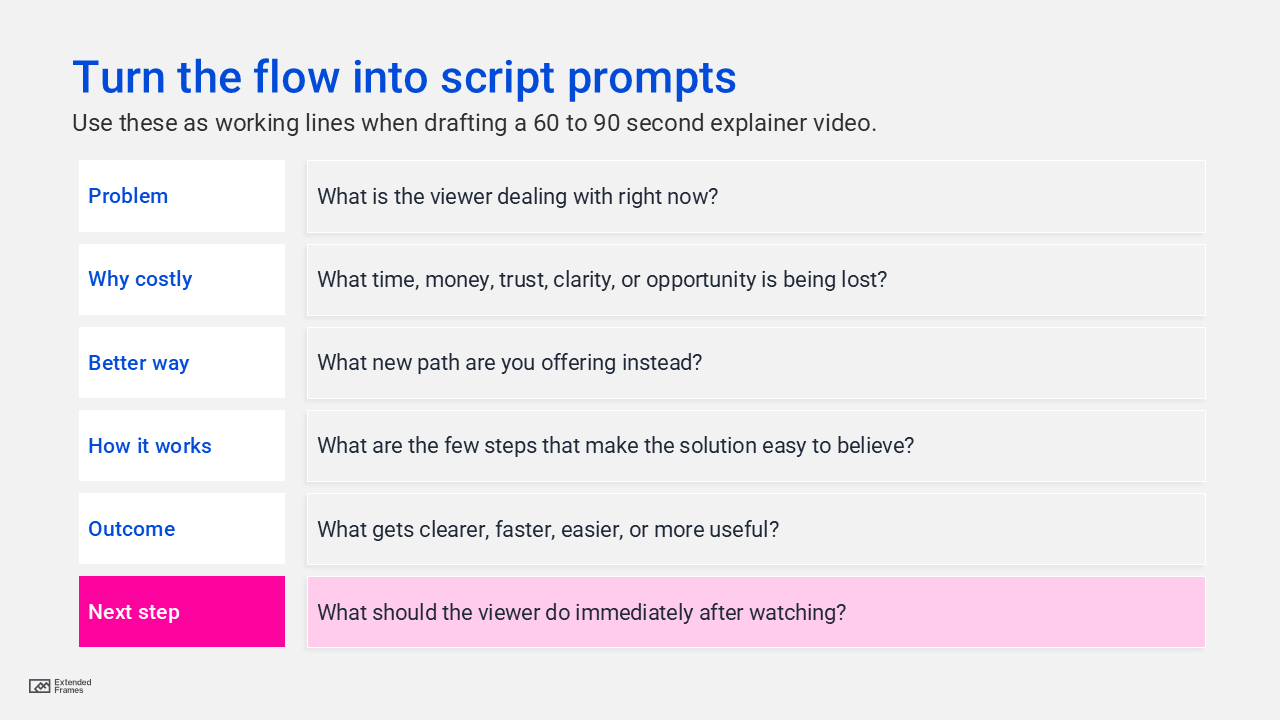
This structure works because it follows how people naturally think.
- First, they ask, “Is this about me?”
- Then, “Why should I care?”
- Then, “What are you offering?”
- Then, “How does it work?”
- Then, “What happens if I use it?”
- Then, “What should I do next?”
Here is what that looks like in practice:
| Part of video | What it does | Example |
|---|---|---|
| Problem | Names the viewer’s situation | “Your team has strong ideas, but the message keeps changing across decks, emails, and meetings.” |
| Cost | Shows why it cannot be ignored | “That slows approvals and makes the final story harder to sell.” |
| Better way | Introduces the solution | “An explainer video gives the idea one clear flow.” |
| How it works | Shows the process | “Start with the audience, shape the message, write the script, plan the storyboard, then produce the video.” |
| Outcome | Shows the result | “Now your team has a video that is easier to share, easier to understand, and easier to reuse.” |
| CTA | Gives the next step | “Send your brief or rough notes, and we will help you plan the video.” |
Here the goal is to make the next thought easy.
The script should sound spoken, not written!
This is where many explainer videos start to sound stiff.
- A script is not a website paragraph.
- It is not a product sheet.
- It is not a proposal.
- It is not a slide title.
A video script should sound like something a real person would say out loud. That means shorter sentences. Cleaner transitions. Less jargon. Fewer stacked claims.
Here is a simple test: read the script out loud.
- If you run out of breath, the sentence is too long.
- If it sounds like a corporate announcement, rewrite it.
- If you would not say it to a client on a call, do not put it in the voiceover.
Example script
Video title: Turn Complex Ideas Into Clear Explainer Videos
For most of B2B teams do not struggle because the idea is weak.
They struggle because the idea is hard to explain quickly.
The product has too many features.
The service has too many layers.
The campaign has too many moving parts.
So the message gets stretched across decks, documents, calls, and follow-up emails.
That is where an explainer video can help.
At Extended Frames, we help B2B teams turn complex ideas into clear, structured videos.
We start by understanding the audience. Then we shape the message, write the script, plan the storyboard, and define the visual direction.
After that, we bring the idea to life through motion graphics, clean layouts, voiceover, captions, and brand-consistent design.
The result is a video your audience can understand faster, your sales team can share more easily, and your marketing team can reuse across campaigns.
Have an idea that needs to be explained clearly?
Send us your brief, deck, or rough notes, and we will help you plan the right explainer video.
Storyboard before you animate
A storyboard is where the video becomes real before production begins. It does not have to be beautifully illustrated at first. A simple table is enough. The goal is to check whether the video flows.
A useful storyboard should show:
| Storyboard item | Why it helps |
|---|---|
| Voiceover | What the viewer hears |
| Visual idea | What the viewer sees |
| On-screen text | What should be remembered |
| Motion direction | How attention moves |
Here is a storyboard example:
| Scene | Voiceover | Visual idea | On-screen text |
|---|---|---|---|
| 1 | “Most B2B teams do not struggle because the idea is weak.” | A strong idea surrounded by messy notes, slides, and emails | Strong idea. Unclear story. |
| 2 | “They struggle because the idea is hard to explain quickly.” | The notes spread across different screens | Too much scattered information |
| 3 | “An explainer video gives the idea one clear flow.” | The scattered pieces begin to align | One clear message |
| 4 | “We shape the message, write the script, and plan the storyboard.” | Three simple steps appear | Message. Script. Storyboard. |
| 5 | “Then we bring it to life with motion graphics and clean visuals.” | A polished video frame appears | Designed for clarity |
| 6 | “So your audience can understand faster and take action.” | Viewer watches, shares, and clicks the CTA | Easier to understand. Easier to share. |
| 7 | “Send us your brief, deck, or rough notes.” | CTA screen | Plan your explainer video |
This is also where good design choices protect the message. If there is too much text on screen, the viewer stops listening. If everything moves at the same time, attention breaks. If the visual does not match the voiceover, the viewer has to work harder.
Good explainer video production uses motion to guide attention, not decorate every second.
Choose the video style after the message is clear
Once the script and storyboard are working, then choose the production style.
This order is important. If you choose the style too early, you may force the message into the wrong format.
| Style | Best for | Be careful when |
|---|---|---|
| Motion graphics | B2B services, SaaS, workflows, abstract ideas | The visuals become too generic |
| Character animation | HR, training, education, lighter topics | The tone feels too childish for the buyer |
| Product screen demo | Software walkthroughs | The video becomes too dry |
| Live action | Founder message, customer story, brand trust | Filming adds time, cost, and logistics |
| Mixed media | Campaigns, launches, thought leadership | The concept needs strong direction |
| Whiteboard style | Process education | The style may feel dated if not handled well |
For many B2B teams, motion graphics are the most practical choice. They can explain processes, service models, workflows, frameworks, and abstract ideas without requiring a full shoot.
They also work well when the video needs to be repurposed into shorter assets for LinkedIn, sales emails, landing pages, and presentations. That approach pairs well with a short-form video toolkit for consultants, where one strong idea can be broken into several smaller pieces of content.
How long should an explainer video be?
Most explainer videos should be shorter than the team wants them to be. That does not mean every video has to be 30 seconds. Some ideas need more time. But the video should not keep talking after the viewer already understands the point.
For most B2B marketing and sales use, 60 to 90 seconds is a useful range. For simple campaign explainers, 30 to 60 seconds can work. For product walkthroughs, onboarding, or technical education, 2 to 3 minutes may be fine.
| Length | Best use |
|---|---|
| 15 to 30 seconds | Teasers, ads, short social clips |
| 30 to 60 seconds | Simple offer or campaign explanation |
| 60 to 90 seconds | Homepage, service, or sales explainer |
| 90 to 120 seconds | More layered B2B offer |
| 2 to 3 minutes | Product walkthrough or onboarding |
| Over 3 minutes | Training, tutorials, internal education |
Wyzowl’s 2026 report also points to short videos as a strong preference for people learning about products and services, with many viewers choosing short-form video over other formats.
The production process should not feel chaotic
A smooth explainer video project usually follows this order:
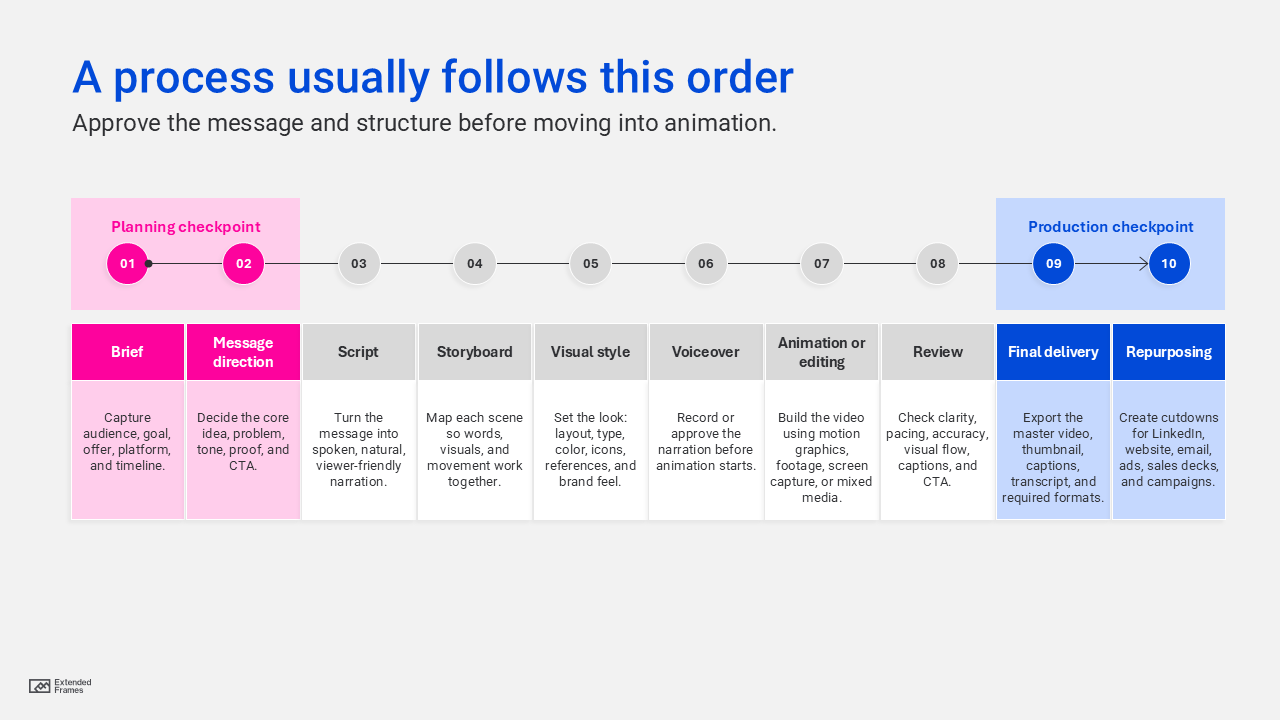
If the team jumps straight to animation, revisions become expensive and frustrating. It is much easier to fix a line in a script than to rebuild an animated scene.
What to prepare before production
| What to prepare | Why it helps |
|---|---|
| Audience | Keeps the message focused |
| Goal | Defines what success means |
| Core message | Prevents the script from wandering |
| Product or service notes | Gives the writer useful detail |
| Brand assets | Keeps the video visually consistent |
| Proof points | Adds trust |
| CTA | Gives the viewer a next step |
| Usage plan | Helps decide format, length, and cutdowns |
This is where many businesses benefit from a design partner rather than only a production vendor. If the brief is rough, the job is not just to animate it but to help shape it.
That is the difference between video production and useful creative partnership. Extended Frames already talks about this through presentation design services, where the work often includes structure, clarity, and decision support before design execution begins. The same thinking applies to explainer videos.
Do not publish one video and leave it there
A good explainer video should not sit quietly on one page and do nothing else. If it is planned well, it can support several parts of the business.
| Where to use it | How it helps |
|---|---|
| Homepage | Explains the business quickly |
| Service page | Clarifies one offer |
| Landing page | Supports conversion |
| Sales email | Gives prospects a simple overview |
| Proposal | Explains the process or value |
| Sales deck | Works as a linked or embedded asset |
| Becomes short captioned clips | |
| YouTube | Supports search and discoverability |
| Events | Works as an opener or booth loop |
| Onboarding | Reduces repeated explanation |
Google’s video SEO guidance recommends making videos easy to find and fetch, using high-quality thumbnails, adding structured data where relevant, and helping users navigate important video moments.
That means the production plan should include the publishing plan.
A useful final package may include:
| Asset | Use |
|---|---|
| Full video | Website, YouTube, sales follow-up |
| 30-second cutdown | LinkedIn, email, campaign pages |
| 15-second cutdown | Ads and teaser posts |
| Vertical version | Reels, Shorts, Stories |
| Captions | Accessibility and silent viewing |
| Transcript | SEO, accessibility, and sales support |
| Thumbnail | Better click-through |
| Storyboard frames | Carousel or sales slide reuse |
This is where video becomes part of a larger video marketing campaign instead of a one-time deliverable.
Do not forget captions, transcripts, and accessibility
Many people watch videos without sound. Some cannot hear the audio clearly. Some are watching in a busy place. Some prefer scanning before committing to the full video.
So captions and transcripts are not extras. They make the video easier to use.
Nielsen Norman Group recommends captions and a full transcript for video content, both for accessibility and to help users choose the parts that are relevant to them. WCAG 2.2 also states that captions should be provided for prerecorded audio content in synchronized media, except when the media is already an alternative for text and clearly labeled that way.
For a business video, this is practical steps to take for the video to be easy to watch and easy to use.
- Captions help silent viewers.
- Transcripts help scanners.
- Clear thumbnails help clicks.
- Good titles help search.
- A nearby CTA helps action.
What to avoid
| Mistake | What happens | Better choice |
|---|---|---|
| Starting with the company | The viewer may not feel included | Start with the viewer’s problem |
| Adding too many features | The message becomes crowded | Focus on the strongest selling point |
| Writing like a brochure | The voiceover feels stiff | Write like a real conversation |
| Skipping the storyboard | Production becomes guesswork | Plan the scenes first |
| Using generic visuals | The video feels forgettable | Use examples close to the buyer’s world |
| Making every scene busy | Attention gets split | Use motion to guide the eye |
| No captions | Silent viewers miss the message | Add captions and transcript |
| Weak CTA | The viewer does not know what to do next | End with one clear action |
| No cutdowns | The video gets underused | Plan repurposing from the start |
The biggest mistake is making the video look finished before the message is ready.
Explainer video brief
Before/ when writing the script, think of these questions:
| Question | Why it helps |
|---|---|
| Who is watching this video? | Keeps the message relevant |
| What do they already understand? | Prevents over-explaining |
| What are they confused about? | Shows what the video needs to fix |
| What should they believe after watching? | Gives the video a persuasive goal |
| What should they do next? | Shapes the CTA |
| Where will the video be used? | Affects length and format |
| What proof can we include? | Builds trust |
| What should we leave out? | Protects the focus |
That last question is important. A good explainer video is shaped as much by what you remove as what you include.
Explainer video production works best when the planning is clear before the production begins. The goal is to help someone understand the idea faster, trust it sooner, and take the next step with less confusion.
A strong explainer video needs a clear viewer, a real problem, one main message, a simple story structure, a script that sounds human, visuals that support the point, and a call to action that feels natural.
If the idea is hard to explain in one meeting, one slide, or one webpage, an explainer video can help.
But do not start with animation.
Start with the message.
Need help planning an explainer video? Extended Frames helps B2B teams turn complex ideas into clear marketing videos, motion graphics, and visual stories that support sales, campaigns, onboarding, and business communication. Send your brief, deck, or rough notes, and we will help shape the right video plan.