
AI presentation maker vs presentation designer: Which one do you need?
An AI presentation maker vs presentation designer decision usually comes down to one question: do you need a fast draft, or do you need a presentation that can carry business pressure?
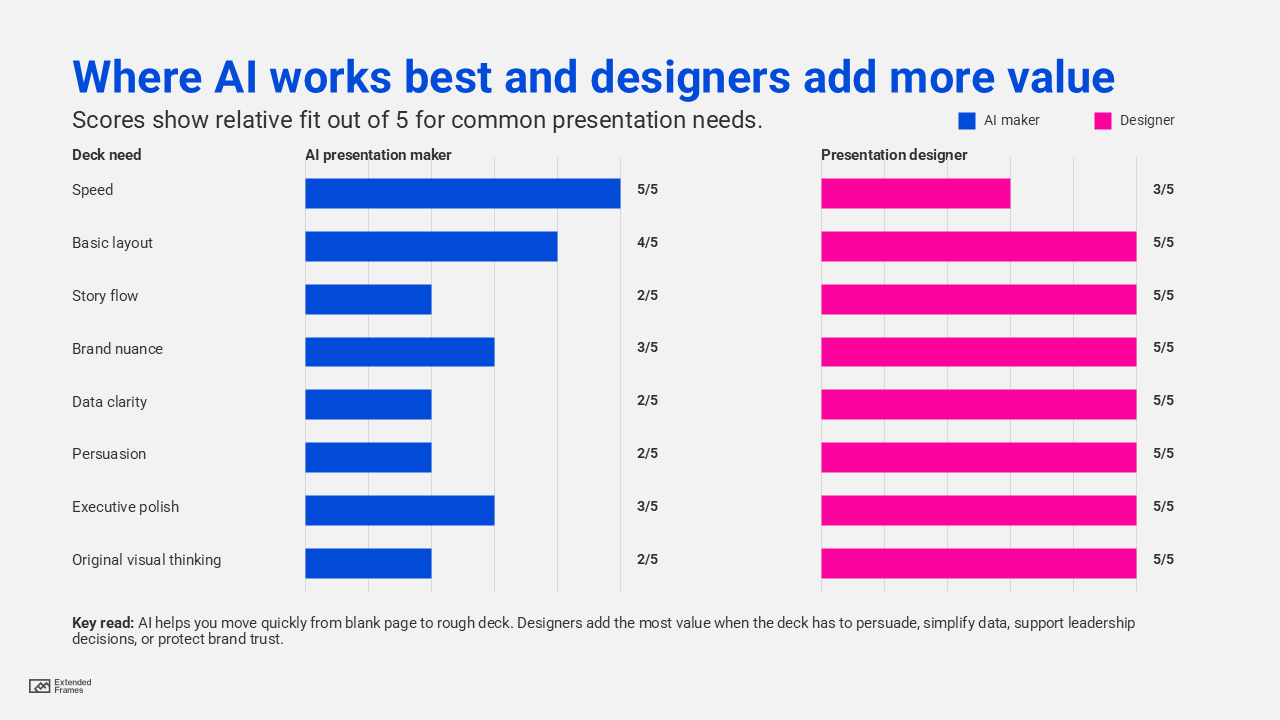
AI presentation makers are useful when you need speed, structure, and a quick visual starting point. A presentation designer is better when the deck needs strategy, story flow, audience persuasion, brand consistency, visual hierarchy, data clarity, and polished execution. In many business situations, the smartest answer is not AI or designer. It is AI for the first draft, then a designer for judgment, refinement, and business impact.
AI adoption is no longer a fringe workflow. Microsoft’s 2025 Work Trend Index reports that 24 percent of leaders say their companies have already deployed AI organization-wide, while only 12 percent remain in pilot mode. Microsoft also notes that PowerPoint edits spike 122 percent in the final 10 minutes before a meeting, which says a lot about why teams are looking for faster ways to build and improve decks.
But speed is not the same as clarity. Canva’s 2025 Visual Communication Report says 84 percent of respondents report that poor visual communication causes delays and confusion. That is where the real comparison begins.
What is an AI presentation maker?
An AI presentation maker is a tool that helps create slides from a prompt, document, outline, or existing content. Tools such as Microsoft Copilot in PowerPoint, Canva Magic Design, Gamma, Prezi AI, and Beautiful.ai can help users draft slides, suggest layouts, create visual starting points, and speed up early production.
For example, Microsoft says Copilot in PowerPoint can help users create a new presentation from a prompt. Canva describes Magic Design for Presentations as a tool that can create slides quickly and then allow users to add details and apply branding.
What AI presentation makers are good at
AI presentation makers are useful for:
| Task | How AI helps |
|---|---|
| First draft | Turns rough ideas into an initial slide structure |
| Basic layouts | Creates clean-looking slides from templates |
| Speed | Helps teams avoid starting from a blank page |
| Content repurposing | Converts notes, documents, or outlines into slides |
| Internal drafts | Gives teams something to review quickly |
| Simple presentations | Works well for low-risk updates, recaps, and internal explainers |
AI tools are especially helpful when the goal is speed. But here is the catch: a deck that looks “presentable” is not always ready to persuade.
What does a presentation designer do?
A presentation designer does much more than decorate slides. A good presentation designer helps shape how the audience understands the message.
A designer looks at:
| Area | What the designer improves |
|---|---|
| Story | What should come first, what should be removed, and what needs more proof |
| Audience | What the reader or listener needs to believe, remember, or act on |
| Visual hierarchy | Where the eye should go first, second, and third |
| Brand consistency | Whether the deck feels aligned with the company’s visual identity |
| Data clarity | Whether charts and numbers are easy to understand |
| Slide pacing | Whether each slide supports the next one |
| Executive polish | Whether the deck feels credible in a high-stakes setting |
Visual hierarchy helps guide the eye to the most important elements through contrast, scale, grouping, and color. Good visual design also depends on grids, consistency, hierarchy, and intentional use of color. These are judgment-based decisions, not just layout choices.
A presentation designer also thinks about business context. A sales deck, investor deck, board presentation, event keynote, training deck, and product launch deck do not need the same structure. Each one has a different audience, level of detail, proof requirement, and call to action.
AI presentation maker vs presentation designer: Quick comparison
| Criteria | AI presentation maker | Presentation designer |
|---|---|---|
| Best for | Fast drafts and simple slides | Strategic, high-impact business decks |
| Speed | Very fast | Slower, but more thoughtful |
| Cost | Usually lower | Higher investment |
| Story judgment | Limited unless heavily guided | Strong when paired with business context |
| Brand consistency | Good if templates and brand kits are set up well | Stronger for custom brand systems and complex use cases |
| Data visualization | Can create basic charts | Can simplify, reframe, and make data persuasive |
| Audience fit | Depends on prompt quality | Built around audience needs |
| Originality | Can feel template-based | Can be more tailored and distinctive |
| Accessibility | Must be manually checked | Can be designed with contrast, readability, and hierarchy in mind |
| Best use case | Internal drafts, quick proposals, simple explainers | Sales decks, pitch decks, investor decks, executive decks, campaign decks |
Bottom line: AI helps you create slides faster. A presentation designer helps you make the right slides.
Where AI works best and where designers add more value
When an AI presentation maker is enough
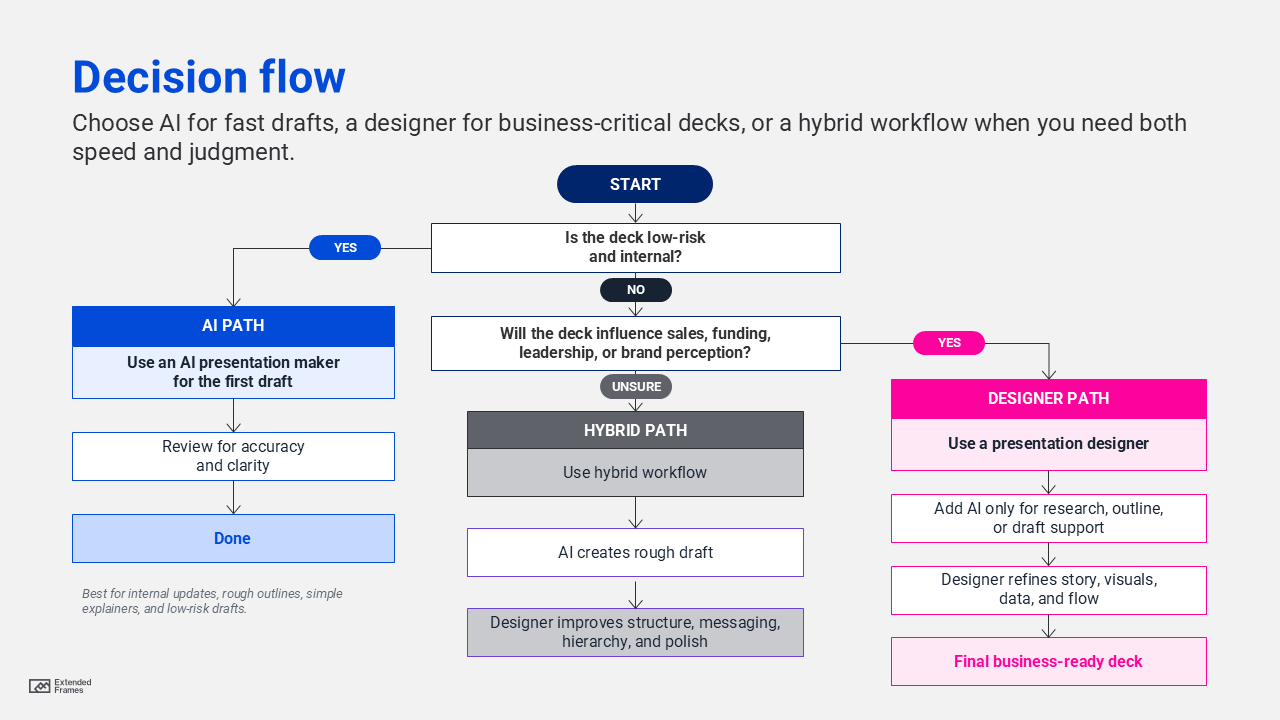
An AI presentation maker may be enough when the deck is low-risk, internal, and not heavily dependent on persuasion.
Use AI when you need:
1. A quick internal update
Example: a weekly project update, team recap, task summary, or internal status report.
In this case, the audience already understands the context. The goal is not to persuade from scratch. The goal is to organize information quickly.
2. A first draft from rough notes
AI is useful when you have meeting notes, bullet points, or a rough outline and need a starting structure.
Example prompt:
Create a 10-slide internal presentation for a marketing team update. Include slides for campaign goals, progress, blockers, next steps, and decisions needed.
3. A simple educational deck
If you are creating a basic explainer deck for a familiar topic, AI can help with the first version.
Example: “What is brand consistency?” or “How to prepare for a client kickoff call?”
4. A rough visual direction
AI can help you test different formats, slide titles, and content groupings before investing more time in design.
5. A deck that will still be reviewed by a human
This is the safest use case. AI creates the draft, but a human checks accuracy, tone, structure, and design.
Google’s search guidance emphasizes helpful, reliable, people-first content. That principle applies to decks too. AI can assist, but the final output still needs human judgment, accuracy checks, and audience relevance.
When you need a presentation designer
You need a presentation designer when the deck has business consequences.
That includes:
1. Sales decks
A sales deck needs to move a buyer from interest to confidence. It cannot simply list services or features. It needs to show the problem, the cost of inaction, the solution, proof, differentiation, and next steps.
An AI tool may create a clean sales deck, but a designer can help answer harder questions:
| Sales deck question | Why a designer helps |
|---|---|
| What does the buyer care about first? | Shapes the opening story |
| What should be shown visually instead of explained in text? | Reduces slide clutter |
| Which proof points deserve more emphasis? | Builds trust |
| Where should the call to action appear? | Improves conversion flow |
| What should be removed? | Keeps attention on the sale |
2. Pitch decks
A pitch deck is an argument for why the opportunity is worth attention. A designer helps shape:
| Pitch deck section | Designer’s role |
|---|---|
| Problem | Make the pain clear and specific |
| Market | Show scale without overwhelming the slide |
| Product | Explain the solution quickly |
| Traction | Make progress visible |
| Business model | Simplify how money is made |
| Ask | Make the next step clear |
3. Executive presentations
Executives need clearer decisions. A designer can turn dense content into:
| Dense version | Better executive version |
|---|---|
| “Here are all the updates from the quarter” | “Three shifts changed our performance this quarter” |
| “Here are 12 charts” | “Here are the 3 numbers that require action” |
| “Here is the full project history” | “Here is the decision we need today” |
4. Complex data presentations
AI tools can create charts, but they may not know which chart best supports the message. A designer can choose the right visual form, reduce noise, highlight the key number, and make the insight easier to read.
Harvard Business School Online describes data storytelling as communicating insights through narrative and visualization. That combination is exactly where business presentations often need human judgment.
5. Brand-sensitive presentations
If your deck goes to investors, clients, partners, leadership, or event audiences, brand consistency becomes more important. A brand-sensitive deck needs:
| Design need | Why it is important |
|---|---|
| Correct typography | Makes the deck feel professional |
| Consistent colors | Protects brand recognition |
| Proper spacing | Improves readability |
| Clear hierarchy | Guides attention |
| Custom visuals | Avoids generic template fatigue |
| Polished transitions | Supports flow without distraction |
6. Accessibility-sensitive decks
Presentation slides should be readable for different viewers, devices, rooms, and lighting conditions. Recommends a contrast ratio of at least 4.5:1 for normal text and 3:1 for large text. This is especially relevant for presentation slides because they are often viewed on projectors, video calls, mobile screens, and shared PDFs.
AI tools may create attractive slides, but contrast, readability, and accessibility should still be checked manually.
Decision flow
Deck risk level by use case
The higher the business risk, the more valuable a presentation designer becomes. Below is the table chart ranking deck types by business risk and recommended approach.
| Deck type | Risk level | Recommended approach |
|---|---|---|
| Internal team update | Low | AI presentation maker |
| Weekly project recap | Low | AI presentation maker |
| Training deck | Medium | AI first draft, designer review |
| Webinar deck | Medium | Hybrid workflow |
| Sales deck | High | Presentation designer |
| Pitch deck | High | Presentation designer |
| Board deck | High | Presentation designer |
| Product launch deck | High | Presentation designer |
| Investor deck | Very high | Presentation designer |
| Conference keynote | Very high | Presentation designer |
AI presentation maker vs presentation designer: Cost, time, and quality
The right choice is not always about budget, consider what the deck needs to achieve.
| Factor | Choose AI when | Choose a designer when |
|---|---|---|
| Timeline | You need a rough draft today | You have time to shape the message properly |
| Budget | Budget is limited and the deck is low-risk | The deck supports revenue, funding, or leadership decisions |
| Audience | Internal team already knows the context | Audience is new, skeptical, senior, or external |
| Content | Message is simple | Message is complex or sensitive |
| Brand | Basic brand template is enough | Brand consistency and polish are important |
| Data | Data is simple | Data needs interpretation |
| Outcome | Inform | Persuade, align, sell, or secure approval |
The best workflow: AI and designer together
The best approach for many teams is a hybrid workflow. AI can reduce blank-page friction. A designer can turn the draft into a presentation that works.
| Step | Who or what leads | Output |
|---|---|---|
| 1. Brief | Human team | Audience, objective, context, deadline |
| 2. Rough outline | AI and human | First structure |
| 3. Story review | Designer | Stronger narrative and slide order |
| 4. Content cleanup | Designer and subject expert | Clearer headlines, fewer words |
| 5. Visual system | Designer | Layout, type, color, spacing, hierarchy |
| 6. Data design | Designer | Charts with clearer insights |
| 7. Brand polish | Designer | Consistent and professional deck |
| 8. Final QA | Human team | Accuracy, accessibility, and delivery readiness |
This approach reflects where AI is heading in the workplace. McKinsey’s 2025 State of AI report notes that organizations seeing value from AI are more likely to define when AI outputs need human validation for accuracy. In presentation design, that validation is not just factual. It is strategic, visual, and audience-based.
Pitfall to avoid when using an AI presentation maker
1. Treating the first draft as the final deck
AI can create a draft quickly, but the first version often needs sharper headlines, better slide logic, stronger proof, and cleaner visuals.
2. Using vague prompts
Weak prompt:
Make me a sales deck.
Better prompt:
Create a 12-slide B2B sales deck for a creative design partner helping marketing consultants improve presentations, campaign visuals, and marketing videos. The audience is a mid-sized consulting firm. The tone should be clear, confident, and business-focused.
3. Accepting generic slide titles
Generic titles weaken the deck.
| Generic title | Stronger title |
|---|---|
| About Us | We help B2B teams turn complex ideas into clearer business communication |
| Our Services | Three creative support areas that help marketing teams move faster |
| Case Study | How a clearer sales deck improved client understanding |
| Results | The redesign made the message easier to follow and present |
4. Overloading slides with text
AI often creates slides that look clean but still carry too many words. A designer decides what to show, what to say, and what to remove.
5. Ignoring accessibility
Text contrast, font size, chart readability, and color dependence should be reviewed before sharing. WCAG contrast guidance is a useful baseline for checking whether text is readable enough across different screens and viewing conditions.
6. Assuming good layout means good communication
A slide can look polished and still fail to communicate. Good presentation design connects layout, message, proof, and audience action.
How Extended Frames think about this
At Extended Frames, this decision is not about rejecting AI. Rather it is about using it in the right place.
AI can help with speed. But business presentations still need:
| What the deck needs | Why human creative judgment helps |
|---|---|
| Message clarity | The core point needs to be easy to understand |
| Story structure | The deck needs a logical path from problem to action |
| Visual direction | The design should guide attention, not decorate content |
| Brand consistency | Slides should feel like they belong to the company |
| Data simplification | Charts should explain the point clearly |
| Presentation polish | The final deck should feel ready for the room |
For B2B teams, marketing consultants, sales teams, founders, and leadership teams, a deck is a business communication tool that need to be handle with utmost care and important.
As a final recommendation if you need a quick draft, use an AI presentation maker. And if you need a business-ready deck that supports sales, funding, leadership alignment, or brand trust, work with a presentation designer. That difference can change how your audience understands the message, remembers the story, and responds to the next step.