
AI in Design Systems: How to Incorporate AI Into a Design System for Your Business
Most design systems were built for humans: designers, developers, and reviewers scanning docs, clicking components, and following guidelines.
AI flips the model. If you want AI in design systems to work reliably, your system must become machine-readable, not just “a Figma library and a wiki”, but a structured source of truth with tokens, metadata, rules, and approvals.
Why AI belongs in a design system
A design system solves two problems:
- Consistency at scale (shared components, patterns, and tokens)
- Efficiency (reuse, faster build cycles, fewer UI bugs)
AI can amplify both, but only if it’s tethered to the system of record. Otherwise, AI tends to “helpfully invent” variants, naming, spacing, or interaction patterns that look plausible but break your standards.
The best mental model:
AI should not replace your design system.
AI should operationalize it, as a copilot for application and a guardrail for compliance.
Signals that “AI and tokens” is becoming mainstream
Below is a quick snapshot (survey-based) that explains why teams are moving from “manual” systems to AI in design systems workflows:
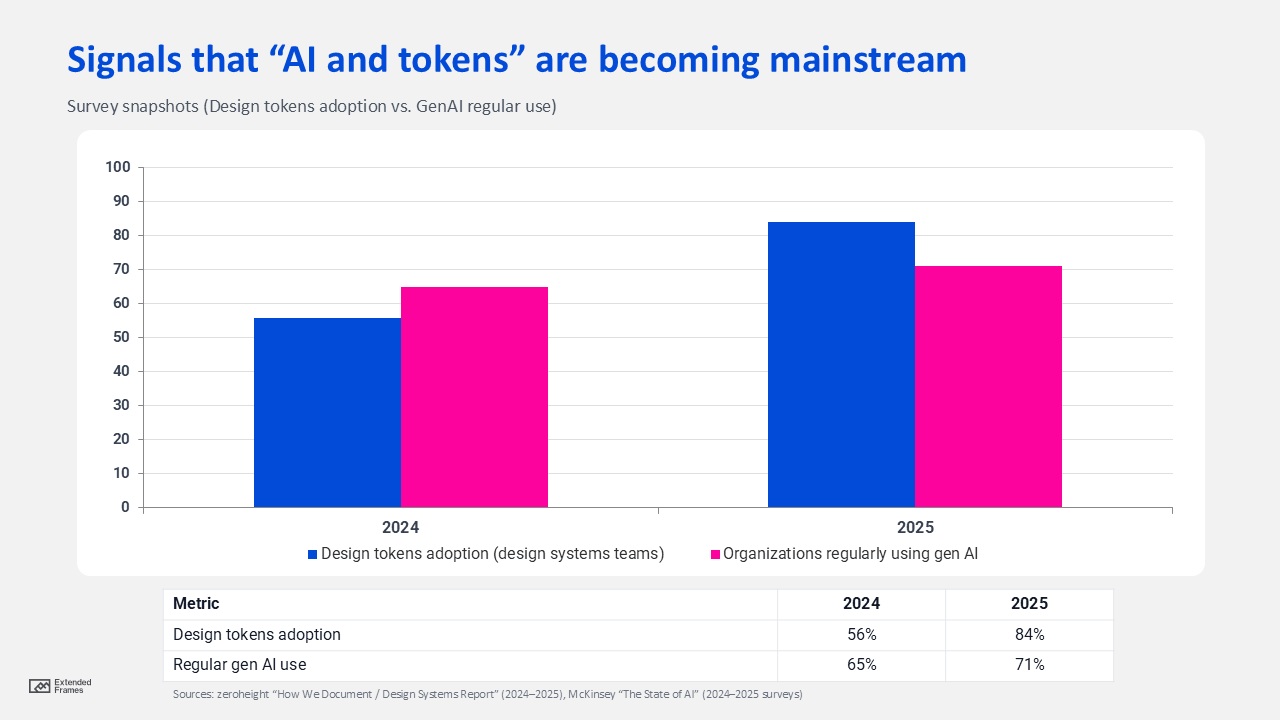
What this implies: tokens are increasingly the “API” between design and code, while genAI is becoming the “UI” for interacting with tools and knowledge, so connecting AI to your tokenized system is the obvious next step.
What “AI in design systems” actually means
Most businesses mean one (or more) of these capabilities:
1. AI as a copilot (apply the system faster)
- Recommends the correct component, variant, and token for a UI need
- Answers “when to use X vs Y” based on your guidelines
2. AI as a builder (create system assets, with review)
- Drafts documentation, examples, usage rules, migration notes
- Suggests token refactors and deprecations
3. AI as a governor (enforce system compliance)
- Flags token drift, inconsistent states, accessibility gaps, off-brand UI
- Opens tickets/ PR comments instead of silently “fixing” things
Step 1: Make your design system machine-readable, the foundation
If you do nothing else, do this: treat your design system as structured data.
A. Standardize your tokens
Design tokens are increasingly being standardized for cross-tool exchange, including a dedicated format specification aimed at portability.
Minimum token set to support AI well
- Color (base and semantic)
- Typography (scale, weights, line height)
- Spacing and layout
- Radius, borders, shadows
- Motion (durations/ easing)
- Accessibility-related tokens (focus ring, target sizes, contrast-safe palettes)
B. Add metadata that AI can reason about
AI needs “rules,” not vibes. For each component/pattern, capture:
- Intent: what problem it solves
- Constraints: what not to do (anti-patterns)
- Variants: allowed combinations (and forbidden ones)
- Accessibility: keyboard behavior, focus states, target size, contrast expectations
- Content rules: tone, microcopy guidelines, truncation rules, error messages
For accessibility baselines, align the system to WCAG 2.2 guidance (including areas like focus appearance and target size).
Step 2: Choose an integration pattern for AI
There are three ways to incorporate AI in design systems, most teams should start with “retrieval-first”:
There are three ways to incorporate AI in design systems:
Pattern A: Retrieval-first assistant
AI answers questions and produces drafts only using your approved sources (docs, tokens, component registry). This reduces hallucinations and makes outputs auditable.
If you want a modern “connector” approach, protocols like Model Context Protocol (MCP) are designed to connect LLM tools to external systems/ data sources in a structured way.
Pattern B: Generative creation (high leverage, higher risk)
AI drafts new docs, example screens, and migration notes, then humans review and merge.
Pattern C: Automated governance (quietly powerful)
AI flags drift and compliance issues (tokens, states, a11y) and creates actionable review items. Think “linting with context.”
High-impact use cases for AI in design systems
| Use case | What AI does | Inputs required | Output | Best guardrail |
|---|---|---|---|---|
| Component selection | Suggests the right component/ variant | Component registry and usage rules | Recommendation and rationale | Retrieval-only answers |
| Token enforcement | Detects “mystery values” and drift | Token source of truth | PR comments/ tickets | Block on lint, not on AI |
| Documentation drafting | Generates anatomy/ usage/ examples | Specs and system docs | Draft docs | Human approval required |
| Accessibility checks | Flags focus/ target/ contrast issues | Tokens and UI specs | Findings and fixes | Align to WCAG 2.2 (W3C) |
| Migration notes | Summarizes breaking changes | Changelog and diffs | Migration guide | Versioning and rollback notes |
| Design-to-code mapping | Maps Figma layers to code components/tokens | Figma structure and code registry | Suggested mappings | Only from approved registry |
Step 3: Put governance around AI
If you’re rolling out AI in design systems inside a business, governance is not optional, it’s what prevents “fast” from turning into “fragile.”
Two widely used governance references:
- NIST AI Risk Management Framework (AI RMF 1.0) for structured risk management and trustworthy AI characteristics.
- ISO/ IEC 42001 for setting up and continually improving an AI management system inside organizations.
If you operate in (or sell into) the EU, note the EU AI Act’s risk-based regulatory approach and obligations depending on use case risk level.
Practical AI governance rules for design systems
| Governance rule | What it looks like in practice |
|---|---|
| Clear accountability | An owner for each AI workflow (docs, code assist, governance bots) |
| “Suggest, don’t ship” | AI drafts; humans approve merges/ releases |
| Source-of-truth enforced | AI must cite the design system docs/tokens it used |
| Audit trail | Store prompts, references, and changes (esp. system-critical edits) |
| Data boundaries | No customer data, credentials, or confidential roadmaps in prompts |
| Vendor data controls | Verify how providers handle training/ data retention (e.g., OpenAI API data controls) (OpenAI Platform) |
A simple reference architecture for AI in design systems
You don’t need a complicated stack, just a clean separation between system truth and AI interfaces:
- Design sources: Figma libraries, variables, specs
- System of record: tokens repo and component registry and documentation site
- Pipelines: export to validate, and to publish (web/ iOS/ android)
- AI layer: retrieval assistant and documentation drafter and governance checker
- Delivery: Figma plugin, Storybook, CI checks, IDE hints, PR comments
The “win” is when AI becomes the easiest way to use the system correctly, while CI/ governance makes it hard to ship off-system UI.
What to measure
To prove AI in design systems is working, track metrics that connect to delivery and risk:
- Adoption: percentage UI using approved components/ tokens
- Drift reduction: fewer “mystery values” and one-off styles
- Cycle time: faster delivery of new variants/ themes
- Quality: fewer UI regressions and accessibility issues
- Ops efficiency: less time spent on repetitive documentation and review
Mistakes to avoid
- Mistake: Letting AI generate UI decisions without system context
Fix: retrieval-first assistant tied to your docs/ tokens - Mistake: Token sprawl (synonyms, inconsistent naming)
Fix: strict naming rules and linting and human approvals - Mistake: AI becomes a shadow design system
Fix: AI must point back to (and quote from) the system of record, every time
Conclusion
Incorporating AI in design systems isn’t about adding a chatbot to your workflow, rather it’s making your design system more structured, more discoverable, and easier to apply consistently at scale. When your tokens, components, and guidelines are machine-readable, AI becomes a practical layer that can speed up documentation, improve system adoption, and catch inconsistencies before they ship.
The teams that win with AI in design systems will treat AI as a governed capability: retrieval-first, anchored to a single source of truth, and backed by clear approvals, accessibility standards, and audit trails. When done right, AI strengthens it by making your system easier to use, harder to break, and faster to evolve.