
When to stop designing: the moment polish stops changing outcomes
You can always improve a design. You can tighten spacing, rewrite a headline, refine an animation, and still find something else to tweak right after. That is why the question is not whether the work can be better. It is when to stop designing and deliver something that is genuinely usable, on time, and aligned with what was promised.
The hard truth, client is not paying for your best possible version. They are paying for a version that solves the problem within the constraints of time, scope, and budget, and is ready to be used, sold, tested, or shipped.
Most do not get stuck because of the lack of skill. They get stuck because “done” is vague, feedback is unbounded, and taste masquerades as strategy. The way out is simple: stop treating delivery like a compromise and start treating it like a professional decision backed by criteria.
Why design never feels finished
Iteration is normal. In design, iterative work is literally the process: make a version, test or review it, improve it, repeat. Nielsen Norman Group describes iteration as repeating steps on purpose to improve the design, often using usability evaluation findings to guide the next version.
But iteration turns into a loop when:
- The goal is unclear, so the team chases “better” instead of “right”.
- Scope is porous, so every comment becomes a new requirement. Asana describes scope creep as deliverables expanding beyond what was agreed, delaying timelines and draining momentum.
- Quality is not defined, so sign off becomes a vibe check. Scrum calls this out directly: a Definition of Done creates shared clarity about what “complete” means and when work is in a usable state to deliver.
If “done” is not written down, you will keep polishing because polishing is the only thing everyone can see.
The mindset shift: define “done” before you open a file
Scrum calls this a Definition of Done: a clear description of what must be true for work to be considered complete and deliverable. You do not need to run Scrum to use the idea. You just need a standard that everyone accepts.
Agile principles put value delivery at the center, not perfecting in private. The Agile Manifesto principles explicitly prioritize early and continuous delivery of valuable work. That is a healthy way to treat design too: ship, learn, improve.
In design terms, that means:
- You do not stop because you are bored.
- You stop because the work meets a clear bar and is ready to perform in the real world.
- You keep improving later, but you do it based on evidence, not anxiety.
The Diminishing Returns Curve: when the last polish costs the most
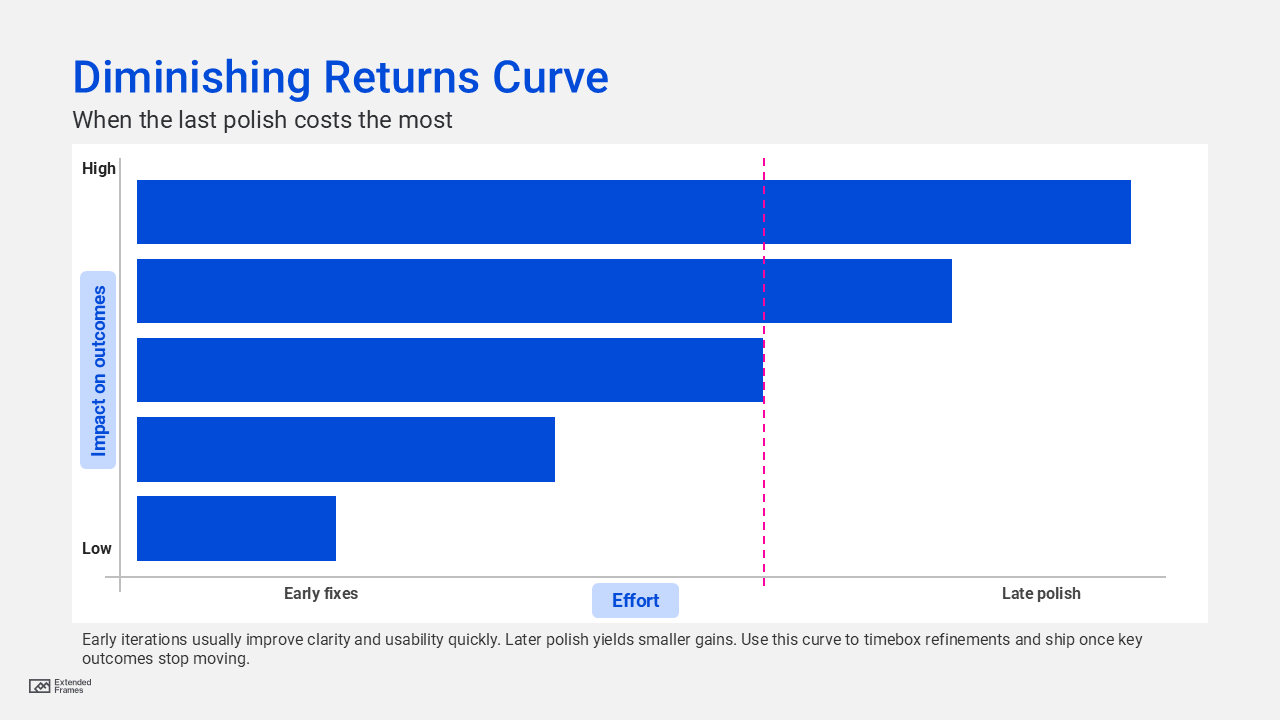
Early work changes the result a lot: structure, clarity, flow, hierarchy. Late work often changes details that only the team notices.
So a useful rule is: If you cannot explain what this change improves (clarity, usability, accessibility, conversion, trust), it is probably polish.
Definition of Done for design deliverables
In product teams, “done” is anchored in measurable task success and user outcomes, not internal preference. NNGroup recommends usability metrics like success rate and time on task, and shows how benchmarks help teams judge improvements.
Use this table as a sign-off checklist. It turns “one more round” into “which criterion is failing?”
| Area | “Done” means | How to verify fast |
|---|---|---|
| Problem and audience | The design clearly serves a defined user and job-to-be-done | One-sentence intent statement and target audience confirmed |
| Core flow clarity | Users can complete key tasks without guidance | Quick task test, measure success rate (Nielsen Norman Group) |
| Information hierarchy | The primary message is obvious in 5 seconds | 5-second test with 3 people, summarize what they noticed |
| Brand consistency | Type, color, tone, and layout follow brand rules | Brand checklist, tokens, and component usage review |
| Accessibility baseline | Contrast and structure meet agreed baseline | WCAG quick checks for contrast, headings, focus states (W3C) |
| Edge cases that matter | Known high-risk cases are handled | List top 5 edge cases and confirm coverage |
| Production readiness | Specs, assets, and handoff are complete | Export packs, dev notes, naming, component states |
| Stakeholder alignment | Decision-makers approve what was agreed | One sign-off moment, documented |
If the table is green, ship. If it is not green, fix only what fails the table.
Use metrics to stop designing with confidence
What you needs is one or two measures tied to the main task. Nielsen Norman Group highlights success rate as a simple usability metric, and also lists common usability measures like time on task and errors.
Stop signals that remove subjectivity
| Signal | What it looks like in feedback | What you measure |
|---|---|---|
| Task success stabilizes | Fewer “I got lost” comments | Success rate stops improving (Nielsen Norman Group) |
| Time on task stabilizes | Less hesitation, fewer retries | Time drops then plateaus (Nielsen Norman Group) |
| Feedback becomes preference | “I like this more” dominates | Fewer task failures reported |
| Risk flips | Delaying costs more than shipping | Missed launch window, blocked build |
When the numbers plateau, shipping is often the smartest next iteration.
The Ship vs Iterate decision matrix
| Low risk if shipped | High risk if shipped | |
|---|---|---|
| High value improvement | Iterate once, then deliver | Fix now, do not ship broken core |
| Low value improvement | Ship now | Reduce scope or escalate trade-off decision |
Rule: If it is low value and high risk, do not polish. Reduce scope. If it is high value and low risk, do one targeted iteration, then deliver.
The delivery cadence that keeps quality high
When to stop designing, here is a practical strategy used in strong design teams and agencies.
- Lock the brief in writing: A design brief helps prevent scope creep by defining objectives and boundaries.
- Define “Done” before you design: Use the checklist above. Treat it as a contract, not a suggestion.
- Timebox iterations, not effort: Example: two concept loops, one refinement loop, one production loop. Timeboxing protects momentum.
- Test only the top tasks: One task-based test beats ten subjective opinions. Success rate is simple and meaningful.
- Separate “ship” from “improve”: Create a visible backlog: “post-launch improvements.” This gives perfectionists safety without blocking release.
What to say when a project is stuck in “one more round”
Use language that respects quality while protecting delivery.
- “Which Definition of Done item are we failing right now?”
- “What user outcome improves if we do this change?”
- “If we ship today, what is the realistic downside?”
- “If we delay a week, what is the realistic cost?”
- “Let’s park this as post-launch improvement unless it breaks task success.”
This reframes taste debate into value trade-offs.
You do not prove quality by how long you can keep refining. You prove it by delivering work that meets a clear standard, performs in real use, and leaves room for learning. Iterative design is meant to be powered by evaluation and feedback, not trapped by endless polishing.
When to stop designing is when the work is ready to be used, and the next change is just polish that will not change the result.
Deliver. Learn. Improve. And keep your best energy for the next version, where it actually drive results.