
Design your environment, or it will design you
If you do not design your environment, your environment will quietly make decisions for you. It will decide what you notice, what you ignore, what you reach for when you are tired, and what becomes your default on busy days. That is not motivation, it is design.
What this phrase really means
Your environment is not just your room or your desk. It includes:
- Physical environment: space layout, clutter, lighting, food visibility, tools within reach
- Digital environment: phone home screen, notifications, app placement, default tabs, inbox setup
- Social environment: who you spend time with, team norms, meeting culture, shared expectations
- Temporal environment: routines, triggers, time blocks, the order of tasks
When these are unplanned, you end up living by whatever is loudest, easiest, or most available.
Why environment design
1. Habits are strongly tied to context cues
Habit research shows repeated behavior becomes linked to stable contexts. Change the context, and you often weaken the old habit and make room for a new one.
2. Prompts and ease matter as much as motivation
Behavior design frameworks emphasize that behavior happens when motivation, ability, and a prompt come together. Environment design improves “ability” by making the right action easier and the wrong action harder.
3. Defaults shape decisions more than we like to admit
Choice architecture research shows that how options are presented, including defaults, can strongly influence what people do.
4. Clutter competes for attention
Neuroscience work on attention supports a simple point: when many stimuli compete, your brain has limited capacity. Reducing visual noise can help attention stay where you want it.
5. Norms are environmental too
Social norms influence behavior, especially when they are made salient in the moment. Your environment includes the signals your team, friends, and family constantly send.
The Environment Levers
Think of environment design as adjusting a few levers that drive most day-to-day behavior.
| Lever | What it changes | Personal example | Work example |
|---|---|---|---|
| Visibility | What you notice first | Fruit on counter, snacks out of sight | Top 3 tasks visible on desk |
| Friction | How hard something is to start | Gym bag packed by door | Meeting notes template pre-opened |
| Defaults | What happens when you do nothing | Water bottle as default drink | Calendar blocks as default schedule |
| Prompts | What reminds you | Habit cue tied to coffee | Checklist prompt at handoff |
| Sequencing | What comes first shapes the rest | Morning phone stays away | Deep work before inbox |
| Social proof | What feels normal | House rule for screens | Team norm: agendas required |
A framework: D E S I G N
Use this 6-step loop to design your environment without overthinking it.
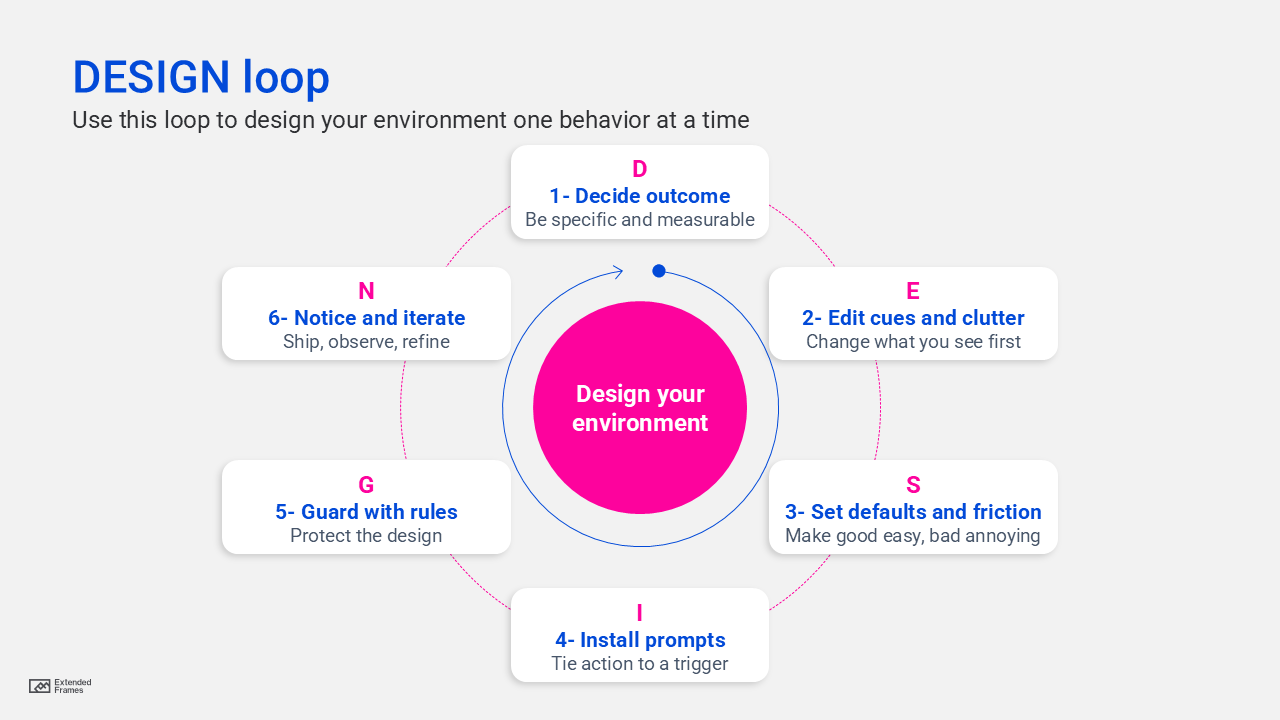
Step 1: Decide A specific outcome
Bad: “Be more productive.”
Good: “Write 300 words daily at 8:30 AM” or “Send proposals within 24 hours.”
Step 2: Edit cues and clutter
- Remove competing cues in your line of sight
- Put the “next right action” where your hand naturally goes
Step 3: Set defaults and friction ((make good easy, bad annoying)
- Add friction to the habit you want less of
- Remove friction from the habit you want more of
Step 4: Link action to a trigger
Implementation intention research supports “if then” planning, where a specific cue triggers a specific action.
Example: “If I sit at my desk, then I open my writing doc before anything else.”
Step 5: Guard with rules
Rules are not willpower. They are boundaries that keep your environment stable:
- “No meetings before 11:00 AM on Tuesdays”
- “No phone in the bedroom”
Step 6: Notice and iterate
Treat it like product design. Ship version 1, observe, refine.
Friction ladder for habit change
| Friction level | Lower friction (do more of it) | Higher friction (do less of it) |
|---|---|---|
| 1 | Within reach | Out of reach |
| 2 | One step to start | Multiple steps to start |
| 3 | Prepped in advance | Requires logins or setup |
| 4 | Scheduled and visible | Not available by default |
| 5 | Socially reinforced | Has a small cost or delay |
Use this ladder to design both sides: increase friction for distractions, decrease friction for priorities.
Professional scenarios: design your environment at work
Scenario A: “I cannot focus, I keep reacting all day”
What is happening: Your environment is optimized for interruption. Notifications, open inbox tabs, and unclear priorities create constant prompts. Choice architecture is driving your day.
Environment redesign moves:
- Make your top 3 outcomes visible on a single page
- Move chat apps off the first screen, turn off non-critical notifications
- Default your browser to a work dashboard, not email
- Put a 50-minute focus timer on your desk, not on your phone
Scenario B: “Our team keeps missing handoffs”
What is happening: Your social and process environment has weak prompts and unclear defaults.
Environment redesign moves:
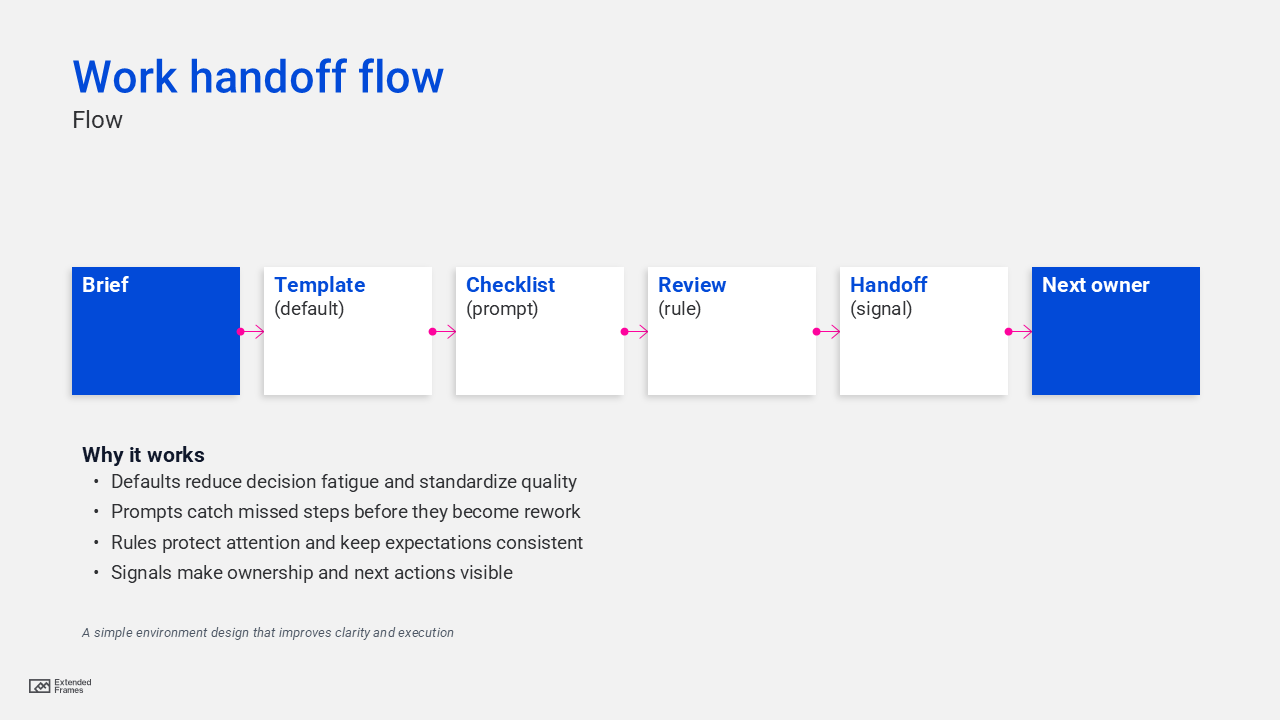
- Default every project handoff to a checklist template
- Make “Definition of done” visible in the same place every time
- Require agendas by default for meetings, otherwise the meeting becomes optional
Work environment flow
Personal scenarios: design your environment at home
Scenario C: “I snack at night even when I do not want to”
Environment redesign moves:
- Visibility: put healthy options at eye level
- Friction: keep snacks out of sight, ideally not in the house
- Default: pre-portion options, so the easiest choice is the better one
Habit research consistently highlights environmental pressures as a major driver of repeated behavior.
Scenario D: “I scroll too much”
Environment redesign moves:
- Add friction: log out, remove the app, or bury it in a folder off the first screen
- Replace the prompt: put a book where your phone normally sits
- Change the cue: charge your phone outside the bedroom
The environment audit checklist
10-minute environment audit
| Area | Question | Fix in 5 minutes |
|---|---|---|
| Desk | What do I see first? | Clear surface, leave only next task |
| Phone | What is my default tap? | Remove most tempting app from home |
| Inbox | What is the default view? | Filter, pin top actions, batch times |
| Meetings | What is the default meeting quality? | Agenda rule, template link required |
| Food | What is most visible? | Make healthy visible, hide snacks |
| Sleep | What is the last cue at night? | Phone out, lamp and book in reach |
| Relationships | What behaviors are “normal” here? | Make norms explicit, name the default |
| Learning | Is the tool ready? | Keep notes app open, book on desk |
| Fitness | Is starting easy? | Shoes and bag by door |
| Money | Are defaults helping? | Automate transfers, remove spending prompts |
Pitfall to avoid when desiging environtment
- Redesign everything at once: Start with one behavior and one environment, then expand.
- Rely on motivation instead of defaults: Defaults win on tired days. Design for tired days.
- Remove a bad habit without replacing the cue: Cues do not disappear, they redirect. Replace the response.
- Ignore social environment: Norms are design. Make the desired norm obvious.
When you design your environment, you stop negotiating with yourself all day. You turn your space, tools, and norms into a system that supports your goals on autopilot.
A useful rule: do not ask, “How do I get more disciplined?”
Ask, “What is my environment currently training me to do, and what should it train me to do instead?”