
How to Maintain Creative Talent with AI Design Tools
A few years ago, your best ideas usually came from sketching, experimenting, and getting stuck for a while. Today, AI can hand you twenty variations before you finish typing the brief. If you want to maintain creative talent with AI, you cannot let that convenience replace the struggle that shapes your voice. Because the truth is simple: creative talent is not just output. It is the ability to choose, refine, and say no to the easy option even when it looks good on the first glance.
To maintain creative talent with AI, you need a clear boundary: AI can help you create options, but it should not replace your choices. Now, design is everywhere, not because the world suddenly got more creative, but because generating polished visuals has become fast and cheap. That is useful, until you notice the side effect: everything starts to look like it came from the same shelf.
The problem is that ‘design is getting same-y.’
When output gets cheap, the market fills up with “good enough.” That does not just change pricing, it changes what audiences notice. Novelty becomes rarer. Clarity becomes a competitive advantage. Taste becomes visible.
Research backs up the sameness risk. A widely discussed study on generative AI ideas found that people can produce outputs rated as more creative with AI support, but the outputs also become more similar to each other, reducing collective novelty.
So the question is not whether AI helps, but how to use it without letting it flatten your voice.
What is creative talent
Creative talent is not one thing. It is a stack:
- Craft: fundamentals like typography, composition, hierarchy, color, spacing, motion, and systems thinking.
- Taste: the ability to critique, edit, and choose what to keep.
- Context: understanding users, constraints, culture, brand, and business goals.
- Motivation and environment: the conditions that let you do deep work and take risks.
That stack maps well to established creativity frameworks that separate domain skills, creativity processes, motivation, and environment.
AI mainly attacks the ‘craft looks finished’ layer. It can output polish without understanding. That is why talent maintenance now depends on reinforcing the layers AI cannot replace: taste, context, judgment, and responsibility.
Also, employers are explicitly valuing human-centered and higher-order skills. The World Economic Forum lists skills like analytical thinking and creative thinking among those expected to remain critical and grow in importance.
The rule that protects your talent
Use AI for breadth, use humans for depth.
- Breadth is generating directions, variations, starting points.
- Depth is choosing the strongest idea, shaping it, and making it true for the audience.
If you only do breadth, your work becomes replaceable. If you own depth, you become hard to copy.
Where AI helps and where your creative talent must lead
| Design stage | AI can help with | Human edge (protect this) | What to practice to maintain creative talent with AI |
|---|---|---|---|
| Brief and intent | Drafting prompts, summarizing notes, generating options | Deciding what the work is really for | Writing tighter briefs, defining success metrics |
| Exploration | Moodboards, variations, layout starting points | Taste, restraint, original combinations | Rapid sketching, critique sessions, reference study |
| Execution | Resizing, production assets, consistency checks | Craft, hierarchy, accessibility tradeoffs | Typography drills, grid systems, design QA |
| Validation | Drafting research scripts, clustering feedback | Real insight, accountability, judgment | User interviews, observation, synthesis writing |
| Ethics and rights | Surfacing risks, drafting disclosures | Permission, provenance, responsibility | Attribution habits, licensing basics, documentation |
The creative talent maintenance loop
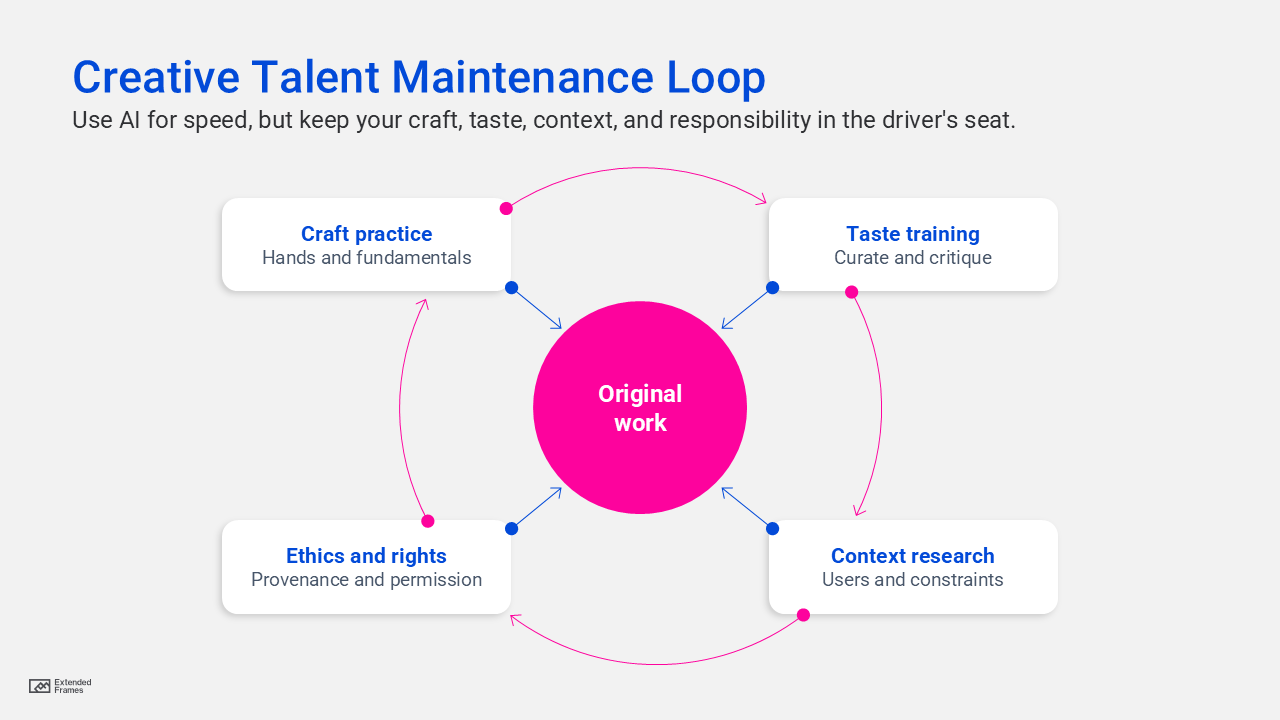
The five habits that keep you original when AI design is everywhere
1. Do not start with prompts. Start with constraints.
AI loves vague prompts because it can fill the gap with average internet guesses. Your job is to be specific.
Try this constraint-first template:
- Audience: who is it for, and what do they fear or want
- Moment: where will they encounter it
- Action: what should they do next
- Tone: what should it feel like
- Exclusions: what it must not look like
Then prompt the AI with your constraints. Do not outsource the constraints.
2. Build a “taste library” that is not just screenshots
Screenshots are fine, but taste comes from understanding why something works.
Make a library entry include:
- what problem it solved
- what the designer chose not to do
- what makes it feel intentional
- what you would change for a different audience
3. Use AI for divergence, then turn it off for convergence
Divergence is the phase where you want many options. Convergence is the phase where you choose, refine, and ship.
A workflow:
- 15 minutes: AI for variations
- 30 minutes: human selection and remixing
- 60 minutes: manual craft pass
- final: critique against the brief
This prevents “prompt chasing,” where you keep regenerating instead of designing.
4. Keep at least one craft skill fully manual
Pick one skill you refuse to outsource for the next 60 days:
- typography and layout
- icon drawing
- illustration style studies
- motion timing
- design systems components
One deeply owned skill becomes a signature.
5. Schedule “no-AI reps” the way athletes schedule training
The fastest way to lose creative talent is to stop doing the reps.
A maintenance plan that fits into work life
| Frequency | Time | Exercise | What it protects |
|---|---|---|---|
| Daily | 10 to 15 minutes | One layout from scratch using only type and shapes | Craft and speed without crutches |
| Twice weekly | 20 minutes | Critique two designs, write what you would change and why | Taste and decision-making |
| Weekly | 45 minutes | Redesign a real screen for a different audience | Context shifting, originality |
| Weekly | 30 minutes | Collect three references and annotate the choices | Taste library growth |
| Monthly | 60 minutes | One user interview or usability observation | Human insight and empathy |
| Monthly | 30 minutes | Rights and provenance check on your assets and tools | Ethical confidence and risk reduction |
What becomes more valuable as AI design spreads
Use this dataset in Google Sheets or Excel to create a column chart. The values are illustrative and meant to be edited to match your niche.
| Skill area | Before widespread AI (1 to 5) | After widespread AI (1 to 5) |
|---|---|---|
| Rote execution | 5 | 2 |
| Style consistency | 4 | 3 |
| Concept framing | 3 | 5 |
| Taste and critique | 3 | 5 |
| User context | 3 | 5 |
Employers continue to emphasize creative thinking and human-centric skills alongside technical shifts, which raises the value of framing and judgment.
The creative moat matrix
This is a quick way to explain career leverage to yourself or your team.
| Low AI leverage | High AI leverage | |
|---|---|---|
| High craft depth | Handmade specialists: strong control, slower output | Creative directors: taste leads, AI accelerates |
| Low craft depth | Template operators: safe but replaceable | Prompt chasers: fast but easy to copy |
If you want to maintain creative talent with AI, aim for the top row, and preferably the top-right cell.
The part designers avoid: ethics, rights, and the “can we ship this” question
The web is still sorting out how authorship works when AI generates material. In the US, the Copyright Office has guidance on registering works containing AI-generated material and emphasizes the human authorship requirement.
And courts continue to reinforce that fully AI-generated works without human authorship do not qualify for copyright protection in the same way, with recent reporting around the Thaler case and the human authorship requirement.
Takeaway for creatives:
- Keep documentation of your human decisions, edits, and original contributions
- Track sources for assets and training claims for the tools you use
- Avoid using AI outputs as if they are automatically protected or automatically safe
Tool policies also differ. For example, Adobe states that Firefly models are trained on licensed content such as Adobe Stock and public domain content, and Adobe has reiterated positions about not training on customer content.
Even if your tool says “licensed,” your professional habit should be provenance: know what you used, where it came from, and what you can prove.
A human workflow that keeps your voice intact
-
Write the brief in plain language
One sentence for audience, one sentence for action, one sentence for tone. -
Generate options fast
AI for breadth. Limit it. Set a timer. -
Choose one direction and commit
Your taste makes the call. -
Do a manual craft pass
Typography, spacing, hierarchy, and accessibility done by you. -
Critique like an editor
Remove anything that feels generic. If it looks like “default AI,” it is not done.
To maintain creative talent with AI, treat AI like a power tool, not a creative identity. Let it speed up exploration and production, but keep your hands on the parts that matter: the brief, the judgment, the edit, and the responsibility. When everyone can generate, the designers who stand out will be the ones who can decide.